
Table of contents
You know the drill.
You plan the webinar. Fix the deck. Invite people. Show up live. Explain the idea as clearly as you can.
Then the questions start.
Someone asks about pricing. Someone asks how it works with their team. Someone pushes back on the main idea. You answer in a way that is way better than the slide you prepared.
Nice moment.
Then the webinar ends and the recording goes into the usual machine.
Replay page. A few LinkedIn clips. Maybe an email with “watch the recording.” Maybe someone says, “Can we get three shorts from this?”
Fine. Nothing wrong with that.
But if you only repurpose a webinar recording for social clips, you miss the pieces that can help buyers move. The objection answer. The live explanation. The customer story. The messy Q&A bit where trust actually happens.
That is the part worth hunting.
Most Teams Repurpose For Reach
Webinar repurposing is not a weird edge case anymore. Current Wistia research says almost 90% of teams reuse webinar content in some way. Their 2026 State of Video also looked at more than 13 million videos, so this is not one tiny survey floating around.
Most teams know they should do something with the recording.
Where things get weak is the default goal.
The usual workflow is simple: pull highlight clips, post them on LinkedIn, maybe turn the transcript into a blog post, upload the replay, move on. That can help reach. It can remind people you exist. It can give your social calendar some life.
But reach is only one job.
Inside a webinar recording, there are often moments that are more useful after someone already knows you. Moments where a prospect hears the exact answer they needed. Moments where you explain your approach in plain language. Moments where a live question forces you to drop the polished pitch and answer like a human.
Those are not random clips.
Those are sales assets.
And if they stay buried in a one-hour replay, your best buyer content is technically published, but practically invisible.
Awareness Clips And Sales Clips
Before you touch the timeline, separate two buckets.
Awareness clips are for people who do not know you yet. They need to stop a scroll. They work on LinkedIn, Shorts, Reels, or wherever your audience sees short video. They should be clear even if someone has zero context.
Sales clips are for people who already have some context. Someone registered and did not book. Someone watched a demo and went quiet. Someone is comparing options. Someone asked your sales team the same question three times.
A sales clip does not need to win the feed.
It needs to help one buyer think, “Ok, that answers it.”
Examples hiding inside webinar recordings:
- a live objection from the Q&A,
- a pricing explanation that feels honest,
- a customer story told in normal words,
- a comparison between your approach and the common alternative,
- a moment where you say who should not buy,
- a clear explanation of why the old way creates pain,
- a demo bit that shows the real workflow, not the polished overview.
Some of those clips might also work publicly. Great.
But do not judge them only by views. A clip that gets 87 views and helps one real sales conversation can be more valuable than a clip that gets 8,000 empty views from people who will never buy.
Annoying for dashboards. True for business.
Score Moments Before Editing
Most teams jump straight from recording to editing. They choose clips because something sounded smart, got a chat reaction, or looked good on camera.
That is guessing.
Before editing, watch the recording once and mark moments. You can do this at 1.5x speed if you know the topic well. Do not make it precious. You are not writing a film script. You are looking for buyer-useful moments.
Score each timestamp on three things:
- Buyer relevance: would this help a real prospect decide?
- Standalone clarity: does the moment make sense without the full webinar around it?
- Shelf life: will this still be useful in three to six months?
Give each one a 1 to 5 score.
Now the pile becomes clearer.
A moment with high buyer relevance and high clarity becomes a sales clip. Send it to your sales team. Put it in follow-up sequences. Add it to nurture. Use it after demos.
A moment with high clarity but low buyer relevance becomes awareness content. Good for social. Fine for reach.
A moment with high buyer relevance but weak clarity needs a wrapper. Add a short intro. Show the slide. Add one sentence before the clip. Then it can work.
A moment that scores low everywhere can stay in the replay.
Don’t get me wrong. This is not fancy. It is almost boring.
But it stops you from turning every decent sentence into content. And that matters, because most webinar recordings have five or six useful buyer moments, not 37.
The Webinar Moment Scorecard
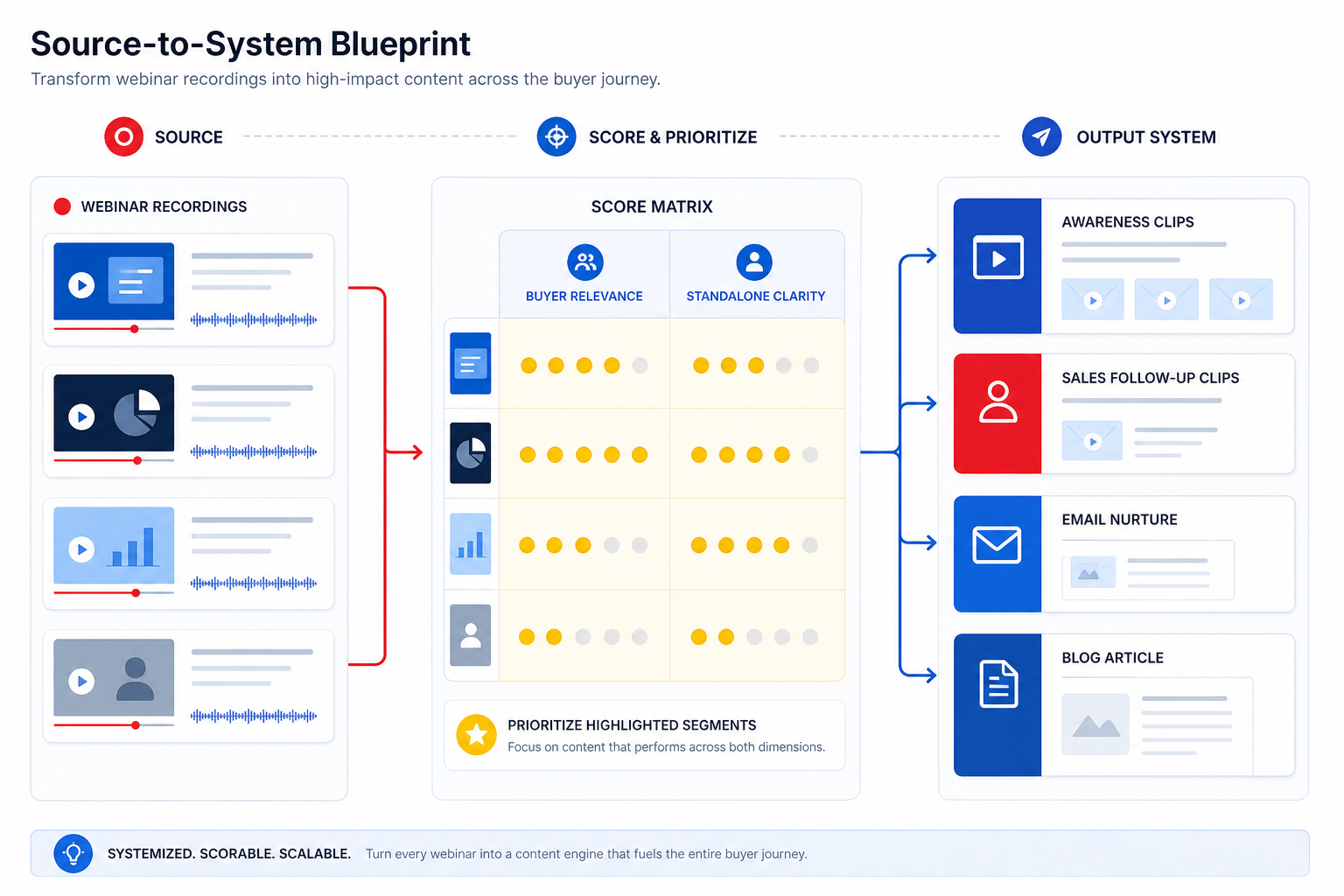
Use this simple workflow after each event.
First pass, mark raw moments:
- 12:30, customer shares a result, feels specific and believable.
- 27:45, pricing logic question, good answer for budget pushback.
- 34:10, live objection handled, useful for prospects stuck on the same thing.
- 41:20, host explains who should not buy, trust builder.
- 52:00, competitor question, positioning moment.
- 58:15, summary of the framework, broad but clear.
Second pass, score each one:
- Buyer relevance from 1 to 5.
- Standalone clarity from 1 to 5.
- Shelf life from 1 to 5.
- Needed wrapper: none, short intro, slide context, or longer article.
Third pass, choose destination:
- Sales clip for high buyer relevance and high clarity.
- Awareness clip for high clarity and lower buyer relevance.
- Email section when the idea needs more explanation.
- Blog section when the answer connects to search intent or a common buying question.
- Replay timestamp when the full context matters more than the clip.
This is where the free Clip Opportunity Map fits nicely. It helps you audit long-form content, see which moments are worth pulling, and understand why those moments matter. It also checks titles and thumbnails for pillar content. Yummy side-effect.
You can do the scoring manually. You can also feed better inputs into an AI content workflow. If you want that second path, this guide on what to feed an AI repurposing system is the next useful read.
Sales Content Has A Different Job
A social clip fights for attention.
A sales clip helps a buyer move.
That difference changes everything: length, hook, edit, caption, CTA, and where the clip goes.
For social, you might cut a 35-second moment with a sharp opening line. You might optimize for retention. You might keep the CTA light because most people are cold.
For sales, the clip can be 90 seconds. Even two minutes if it answers the question properly. The opening does not need to be clever. It needs context.
Something like:
“You asked how this works with a small team. This part from our webinar answers that exact thing.”
That feels different from marketing. It feels like help.
And that is why sales clips often come from the least “viral” parts of a webinar. Q&A. Objections. Boring implementation details. The moment someone admits the limit of the product. The moment you explain when a service is a bad fit.
Those bits might never win on TikTok.
Good. They were not made for TikTok.
They were made for the person who is already close enough to care.
Build A Post-Event Workflow
Here is a simple version you can steal.
Within 48 hours:
- Watch the recording once and mark timestamps.
- Score moments by buyer relevance, clarity, and shelf life.
- Tag each moment as awareness, sales, nurture, blog, or replay.
- Hand awareness clips to the content team.
- Hand sales clips to the sales team with a plain note on when to use them.
Within one week:
- Edit the highest-value sales clips first.
- Add a short context card if the moment needs it.
- Put the clips into CRM snippets, sales follow-up templates, proposal notes, or nurture emails.
- Tell the team the clips exist. This sounds stupidly obvious. It is also the step many teams skip.
Ongoing:
- Track which clips sales actually uses.
- Remove clips nobody touches.
- Before the next webinar, ask better questions on purpose.
- Leave more time for the Q&A moments that keep producing sales content.
This workflow does not need more content.
You already recorded the thing.
It needs a better bridge between the recording and the buyer journey.
That is also why sales calls are useful source material. If webinar questions and sales-call objections keep repeating, you have a strong signal. This article on turning sales calls into content goes deeper into that.
Use Data Without Worshipping It
The numbers support this direction, but they should not be the whole argument.
Wistia says about one third of webinars still get plays three months after the live event. People do watch replays. Wistia’s webinar recap also says 88% of teams repurpose webinar content, 60% make replays available on landing pages, and 60% pull social clips.
HubSpot’s 2026 marketing stats say over half of companies repurpose video into social clips, LinkedIn is the top sharing platform, and 60% use clips to link back to a website.
So yes, repurposing is happening.
But the useful question is what happens after someone watches.
Do they land somewhere useful? Do they get the next answer? Does sales know which clip to send? Does the clip lead back to a replay, offer page, resource, or conversation?
This is the post-watch gap. A lot of teams publish content and then hope the viewer figures out the next step.
Hope is not a system.
Give the viewer a door.
When To Hire Help
If your webinars are occasional, manual scoring is enough.
If you run webinars every month, have a library of old trainings, or want a serious repurposing engine, it may be worth getting help. Not because you need more clips, but because you need someone to map the source material before editing.
That is the thing to check when you look at a webinar repurposing service. Do they only promise output volume, or do they help you decide what should become content in the first place?
Same with a broader content repurposing service. Ask how they pick moments. Ask how they separate awareness from sales content. Ask what happens after the clip is made.
Because “we made 20 clips” sounds productive.
“We found the five moments your buyers needed and put them where sales can use them” is much closer to business value.
Final Thought
Your webinar recording is already full of material.
Some of it is good for reach. Some of it is good for trust. Some of it should stay in the replay and never become a clip.
The work is not to make more stuff from the recording.
The work is to find the moments that help the right person move.
If you want a quick way to see what is hiding inside your long-form content, run the free Clip Opportunity Map. It audits 3 videos and shows which moments are worth repurposing first.
No huge commitment.
Just a better look at what is already there.
Sources
- Wistia, 2026 State of Video: https://wistia.com/learn/marketing/video-marketing-statistics
- Wistia, State of Video Webinar Recap: https://wistia.com/learn/marketing/state-of-video-webinar-recap
- HubSpot, Marketing Statistics: https://www.hubspot.com/marketing-statistics
- HubSpot, 2026 State of Marketing: https://www.hubspot.com/state-of-marketing