
Table of contents
What B2B Video Content Repurposing Should Actually Do
Start With Source Material, Not Formats
The Five B2B Video Moments Worth Repurposing
Use A Simple Scorecard Before You Edit
Match The Asset To The Buyer Job
Do Not Let AI Turn Everything Into Smooth Soup
Add Permission And Disclosure To The Workflow
You record the webinar.
Or the podcast episode. Or the founder video. Or the lesson where you explain the thing for the 57th time because buyers keep asking the same question.
You prepare. You show up. You try to make it useful. You answer objections without calling them objections. You tell a story. You explain why the old way breaks. You maybe even say the one sentence that would make a perfect sales page headline if someone caught it.
Then the video goes live.
Nice.
And two days later everybody is already thinking about the next one.
This is where B2B video content repurposing gets weird.
Because most teams treat repurposing like a production task.
“Can we make 10 clips from this?”
“Can we turn this into a LinkedIn post?”
“Can AI summarize it?”
All valid questions. But they are not the first question.
The first question is: which moments in this video can help a real buyer move one step closer to trust?
That sounds heavier than “make clips”, I know. But if your business sells consulting, coaching, services, courses, B2B products, expert advice, or anything that needs trust before someone buys, this matters a lot.
A random clip can get views and do nothing.
A useful clip can make the right person think, “Oh. They understand the thing I am dealing with.”
Different game.
What B2B Video Content Repurposing Should Actually Do
B2B video content repurposing is not just chopping long videos into short ones.
At least, not if you want it to support the business.
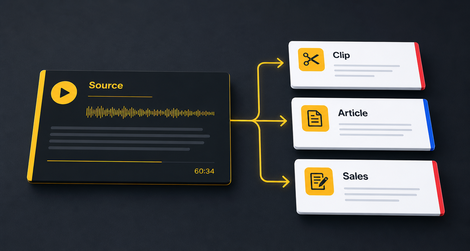
Good repurposing turns one source video into a small system of useful assets:
- clips that warm up the right buyer,
- article sections that answer search and sales questions,
- email angles that bring old leads back,
- quote visuals that make one idea easier to remember,
- sales notes that help you answer objections faster,
- landing-page proof blocks,
- follow-up posts,
- better titles and thumbnails for the original video.
Some of those assets are public.
Some stay internal.
And that is fine.
The goal is not “squeeze every drop from one video” like the video owes you rent.
The goal is to stop losing the best thinking you already paid for with your time, energy, and expertise.
Google’s people-first content guidance is useful here. It asks whether content provides original value, shows real expertise, and helps an intended audience achieve a goal. A strong B2B video can do that. But only if you pull out the useful parts with judgment, not just output volume.
That is why video content repurposing strategy should start before editing.
Editing makes the asset look better.
Selection decides whether the asset deserves to exist.
Start With Source Material, Not Formats
Most repurposing workflows begin with a menu.
Clip.
Carousel.
Blog.
Newsletter.
Shorts.
Reels.
LinkedIn post.
That feels productive because formats are concrete. You can assign them. You can count them. You can say “we shipped 22 assets this week” and feel like a machine.
But a format is just a container.
If the source moment is weak, the container does not save it.
A boring clip with nice captions is still a boring clip. A generic quote card is still generic. A blog post made from a vague section of a webinar is still vague, only longer.
Start with source material instead.
Ask:
- What was the buyer already worried about before this topic came up?
- Which part shows experience, not theory?
- Where did the speaker say something more clearly than the website says it?
- What would a sales lead need to hear before booking a call?
- What moment would make the wrong-fit person leave, and the right-fit person lean in?
That last question is underrated.
Good B2B content should filter.
If your content attracts everybody, your sales process pays for it later.
The Five B2B Video Moments Worth Repurposing
Not every good sentence should become content.
Please.
Some moments are useful in the full video but weak as standalone assets. Some need too much context. Some are private. Some sound exciting but attract the wrong people.
For B2B repurposing, I like looking for five types of moments.
1. The Pain Mirror
This is the moment where the viewer feels seen.
Not “businesses need scalable content operations.”
More like:
“You record a 60-minute webinar, then three weeks later the only thing left from it is one replay link and a guilty note in your task manager.”
That is a pain mirror.
It shows the reader you know the situation from the inside.
2. The Objection Answer
Every good expert video has objections hiding inside it.
Sometimes the speaker says them directly:
“You might think this only works if you already have a big audience.”
Sometimes they are buried in the explanation:
“This is why we score moments before we edit, because the loudest clip is not always the buyer-relevant clip.”
Those moments can become clips, sales emails, article sections, or follow-up posts.
They are boring only if you forget that buyers are often stuck on one small doubt.
3. The Proof Moment
Proof is not only a big case study.
It can be a before-and-after detail. A customer phrase. A decision point. A tiny operational result. A mistake you stopped repeating. A specific reason the process works.
If you have customer material, be careful with permission and context. The customer interviews into content workflow is a better fit for that. But the core rule is the same:
Proof beats polished claims.
4. The Framework Moment
This is where your thinking becomes easier to use.
Maybe you explain a 3-step decision. Maybe you draw a map. Maybe you separate “views”, “trust”, and “next step” in a way that finally clicks.
Framework moments are good for carousels, quote visuals, articles, and sales enablement.
They are also good for AI search, because answer engines and search snippets tend to like clear, answerable explanations. No magic promise here. Just common sense: if your content answers a question cleanly, machines and humans both have an easier job understanding it.
5. The Doorway Moment
This is the moment that naturally points somewhere.
Not a hard pitch.
A door.
Maybe the clip leads to the full webinar. Maybe the article section leads to a service page. Maybe the email points to a diagnostic. Maybe the post asks the reader to check their own archive.
This matters because of the post-watch gap. If someone watches your best clip, nods, and leaves with nowhere useful to go, the moment did not finish the job.
Use A Simple Scorecard Before You Edit
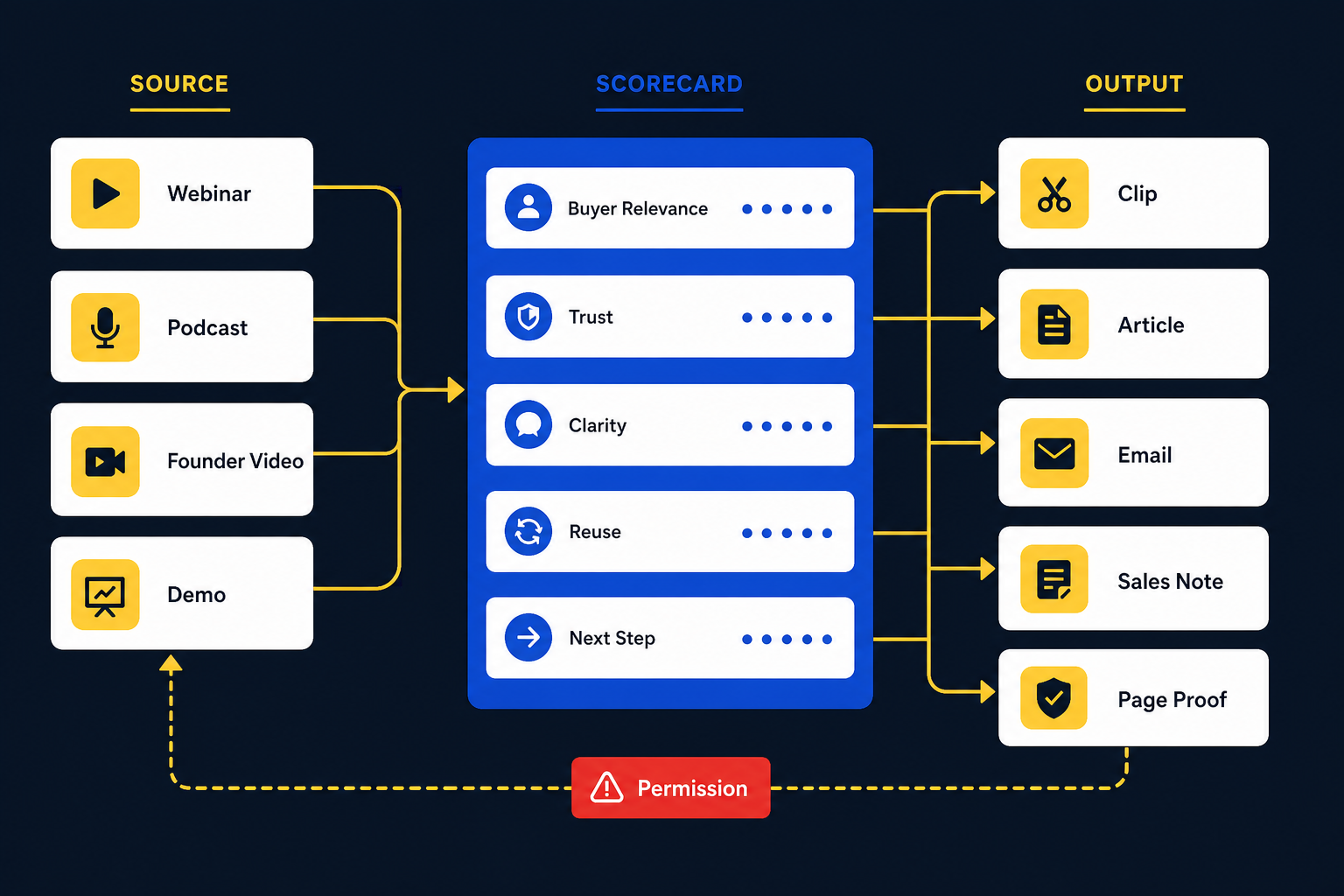
Here is the practical bit.
Before you send a long B2B video to an editor, AI tool, or internal marketer, score the moments.
Not forever. Not with a giant spreadsheet.
Just enough to avoid turning weak bits into pretty assets.
Buyer Relevance
Does this moment speak to a real buyer problem, buying doubt, or decision?
0 means mostly interesting.
1 means useful but broad.
2 means a right-fit buyer would recognize it fast.
Trust Value
Does this moment make the speaker or company more believable?
0 means opinion only.
1 means decent explanation.
2 means shows real experience, proof, or judgment.
Standalone Clarity
Can someone understand this without watching the whole video?
0 means no.
1 means maybe with setup.
2 means yes, with a short hook or caption.
Reuse Range
Can this moment become more than one asset?
0 means no.
1 means one clip or post.
2 means clip, article section, email, sales note, quote, or page proof.
Next Step Fit
Does this moment naturally point to another useful action?
0 means dead end.
1 means educational only.
2 means clear path to a full video, article, service page, diagnostic, or sales conversation.
If a moment scores 8-10, it deserves real attention.
If it scores 5-7, use it carefully.
If it scores under 5, maybe leave it alone.
No shame.
Your archive does not need more content for the sake of content.
It needs the right moments pulled into the right places.
Match The Asset To The Buyer Job
Once you know which moments matter, formats become easier.
A pain mirror is usually good for a short post, hook, or intro.
An objection answer can become a clip, email, sales page section, or article subsection.
A proof moment can become a landing-page block, customer story, sales note, or careful social post.
A framework moment can become a carousel, diagram, blog section, or newsletter.
A doorway moment can become the bridge between the content and the next step.
This is where what to repurpose first becomes useful. You are not asking “what can we make from this video?”
You are asking “which moment has the most business job to do?”
For example:
If the video is a webinar, you may pull one objection answer for a clip, one framework for a carousel, one Q&A section for a blog post, and one proof point for a follow-up email.
If the video is a podcast episode, you may pull one strong story, one quotable opinion, one lesson, and one doorway back to the full episode. If you are hiring help for that, this is what a good podcast repurposing service should be thinking about.
If the video is a customer education session, you may turn the clearest explanation into an article, keep a sales note internally, and create one clip that points back to a deeper resource.
If the video is a webinar, same idea. A proper webinar repurposing service should not only cut highlight reels. It should understand the buying journey around the webinar.
Do Not Let AI Turn Everything Into Smooth Soup
AI is useful here.
Very useful.
It can scan transcripts, suggest clips, cluster themes, draft article outlines, create quote candidates, summarize objections, and help you see patterns across a big archive.
But there is a risk.
AI often smooths the interesting part out of B2B content.
The messy buyer phrase becomes “operational inefficiency.”
The founder’s sharp opinion becomes “a strategic approach.”
The funny aside disappears.
The real objection becomes safe corporate fog.
And suddenly your content sounds like every other B2B brand that discovered content marketing in 2014 and never emotionally recovered.
Use AI for speed.
Use human judgment for taste.
The PodReels research is useful because it names something creators feel: selecting good moments from long video takes real mental effort. Repurpose-10K points in the same direction from another angle: long-to-short repurposing is hard because real video content has audio, visual, and caption signals that need context.
Plain English:
The hard part is not exporting the clip.
The hard part is knowing which clip is worth exporting.
Add Permission And Disclosure To The Workflow
This section is not sexy.
Still important.
B2B videos often contain customer examples, partner mentions, paid collaborations, employee stories, client results, private implementation details, or claims that need context.
Do not treat “it was in the recording” as permission to publish everything everywhere.
Before using a moment publicly, check:
- does it include customer or client details?
- is the claim approved and accurate?
- does a result need context?
- is there a sponsorship, incentive, or relationship that needs disclosure?
- would the person mentioned feel surprised seeing it as a clip?
- should this stay internal as a sales note instead?
The FTC’s endorsement guidance and YouTube’s paid promotion rules both point in the same practical direction: do not mislead people about relationships, incentives, sponsorships, or customer claims.
For most teams, this does not need to become legal theater.
It needs to become a habit.
Name what is safe. Anonymize what should be anonymized. Get approval where needed. Keep risky material internal.
Yummy compliance side-effect.
Build A Small System, Not A Pile Of Assets
Here is a simple way to think about one B2B video.
One strong source video can become:
- One clip that opens the pain or objection.
- One article section that explains the concept with more depth.
- One email that reactivates people who already cared.
- One sales note that helps the team answer the same question faster.
- One next-step bridge to a full video, service page, diagnostic, or related article.
That is enough.
You do not need 47 assets from every recording.
Sometimes five useful assets beat a giant content buffet nobody asked for.
And if you do want a bigger system, build from the scorecard. Stack the high-scoring moments first. Turn those into content. Watch what gets saves, replies, clicks, calls, and useful conversations. Feed that signal back into the next source video.
That is when repurposing becomes a content engine.
Not “we made clips.”
“We know which parts of our expertise move buyers, and we keep turning those parts into useful paths.”
Much better.
Where ContentFries Fits
ContentFries is built around this source-first idea.
The free Clip Opportunity Map looks at your long videos and helps identify which moments are worth repurposing, why they matter, and what they could become.
Not every moment gets treated like gold.
Some moments are better as clips. Some as article sections. Some as proof blocks. Some as internal notes. Some should be skipped.
That decision matters before editing starts.
If you already have long-form videos and want help turning them into a repeatable system, the content repurposing services page is the more direct path.
If you are not sure what is worth pulling from your archive yet, start with the Map.
It is free.
No need to overthink it.
You can check 3 videos and see what is actually worth repurposing first.
Sources
- Google Search Central: Creating helpful, reliable, people-first content
- Wang et al.: PodReels: Human-AI Co-Creation of Video Podcast Teasers
- Wu et al.: Video Repurposing from User Generated Content: A Large-scale Dataset and Benchmark
- Xu, Iqbal, and Montgomery: Measuring Google AI Overviews
- FTC: Disclosures 101 for Social Media Influencers
- YouTube Help: Add paid product placements, sponsorships and endorsements