
Table of contents
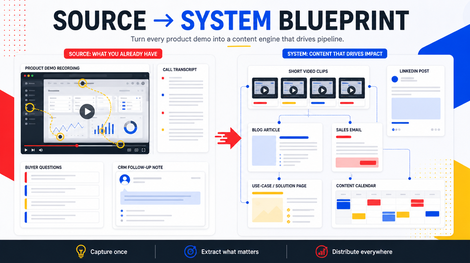
A good product demo is weirdly useful after the call is over.
Not the whole thing. Nobody needs a public 43-minute screen share where someone asks whether the CSV export supports custom columns.
But inside that demo, there are usually three or four moments you can reuse.
A buyer explains the messy workflow they use today.
You show the exact before and after.
Someone asks the question your website should probably answer.
The feature finally makes sense because the use case is real, not imaginary.
That’s content.
Most teams waste it because they treat demos like one-time sales material. Call happens, recording goes into the CRM, maybe the follow-up email gets sent, and then the useful parts disappear.
Fair. Everyone’s busy.
But if your product demos keep answering the same questions, you’re sitting on a content source that already has buyer intent baked in.
Mine that before you record another generic “how it works” video.
Why Demo Recordings Are Different
Product demos are not normal marketing recordings.
There’s real pressure in the room.
Someone is trying to understand whether your thing fits their workflow, budget, team, risk, and timing. They interrupt you. They compare you to what they already use. They ask about edge cases. They reveal what they don’t understand yet.
That makes the recording useful in a way a planned content video often isn’t.
Product education matters. You already know that if you’ve ever watched a buyer get unstuck during a demo.
Your strongest product content is usually hiding inside real use cases, far away from the polished feature tour.
The buyer says:
- “Right now we do this in a spreadsheet.”
- “Can my assistant handle this without asking me every time?”
- “What happens if we have five client projects at once?”
- “How is this different from hiring someone?”
- “Will this still work if we only publish once a week?”
Those questions are better than half the content briefs people invent from a blank page.
They show you what buyers actually need explained.
What To Pull From A Product Demo
Skip your most exciting features for a minute and look straight for the buyer’s moment of clarity.
That’s usually where content lives.
Useful demo moments often fall into five buckets.
1. The messy current workflow
This is the before state.
The buyer explains what they’re doing today. Maybe it’s a spreadsheet, six tools, a freelancer chain, a manual approval loop, a folder full of exports, or a weekly meeting nobody likes.
This can become a strong short clip or post because the pain is concrete.
If your audience hears the current workflow and thinks “yep, that’s us”, you don’t need to over-explain.
2. The “wait, that’s easier” moment
Sometimes the demo changes the room.
You click one thing and the buyer goes quiet for a second. Or they ask you to go back. Or they say, “oh, so that’s the part that saves time.”
That moment is valuable because it shows the product through buyer understanding, not founder excitement.
Turn it into a clip, a GIF, a short explanation, or a product-led post.
3. The objection
Demo objections make great content because they come from real decision friction.
Price, setup time, team adoption, output quality, switching cost, permissions, consistency, integrations, trust.
If the same objection shows up in three demos, it probably deserves a public answer.
This connects nicely with the way you can turn sales calls into content. A demo is often a sales call with a screen share attached.
4. The use case
This is where a feature becomes a real scenario.
For ContentFries, the feature might be clip creation. The use case is more specific:
- turn one coaching call into follow-up clips and posts
- pull objections from a webinar Q&A
- create quote graphics from a customer interview
- turn a podcast episode into sales enablement content
- build a weekly distribution stack from one expert recording
Use cases are better than feature lists because buyers can place themselves inside them.
5. The follow-up asset
After the demo, ask:
What should this person receive next?
Sometimes the answer is a pricing page. Sometimes it’s a case study. Sometimes it’s a clip that explains one concept again. Sometimes it’s a blog post you haven’t written yet.
That missing follow-up asset is content too.
If your sales team keeps typing the same explanation after demos, turn it into a reusable asset.
A Simple Demo-Mining Workflow
Use one recording first. Don’t build a whole content ops cathedral before breakfast.
Pick a demo where the buyer was a decent fit and the conversation had real questions.
Then run this pass.
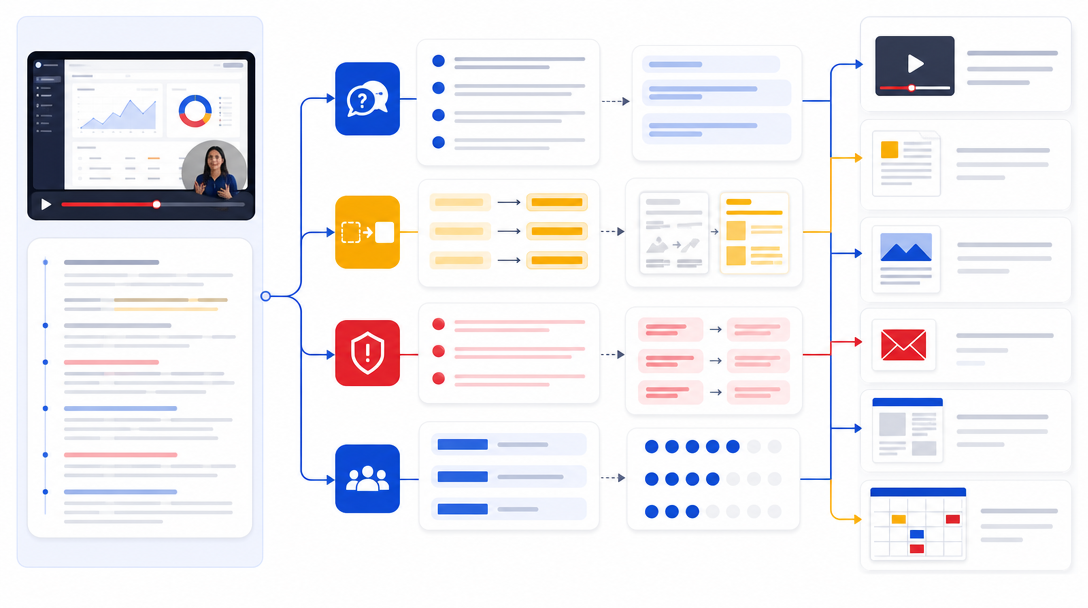
1. Mark buyer questions
Open the transcript and search for question marks, hesitations, and “how would this work if…” moments.
Copy the exact buyer language.
Don’t polish it too early. The messy wording is often the useful part because it sounds like the market, not your positioning doc.
2. Mark before and after moments
Find the part where the buyer explains the old workflow.
Then find the part where your product changes that workflow.
This pair can become:
- a short clip
- a carousel
- a sales email
- a blog section
- a product page proof block
- an internal sales note
That’s how you turn one raw recording into an actual system.
One real use case, several assets.
3. Score the moment
Use a quick 0 to 2 score:
- Buyer frequency: have we heard this before?
- Revenue weight: could this help someone decide?
- Clarity: does the moment make the product easier to understand?
- Reuse range: can it become more than one asset?
- Permission safety: can we use it without exposing private details?
Eight to ten is worth turning into public content.
Five to seven might be sales enablement or a private follow-up asset.
Under five usually stays in notes.
If you want a second set of eyes on the source material before you brief edits, this is where a private Clip Opportunity Map helps. It shows which moments are worth turning into public proof and which ones should stay internal.
4. Choose the first format
Don’t turn every demo moment into a clip first.
Some moments should be written.
If the buyer’s question is the best part, start with a post or blog section.
If the screen share makes the idea obvious, make a short clip or GIF.
If the moment helps a prospect after a sales call, make a follow-up email or sales one-pager.
If it fits a bigger topic, fold it into your content repurposing plan.
Format comes after the job is clear.
Then decide where it belongs. A demo moment can live on LinkedIn, in a sales follow-up, inside a nurture email, on a use-case page, in a sales deck, or as a short clip attached to a founder post. The channel depends on who needs that explanation next.
5. Connect it to the next step
This is where demo content often fails.
Someone watches a nice product clip and then disappears.
Give the asset somewhere to send them:
- a full demo page
- a use-case page
- a related blog post
- a private Clip Opportunity Map
- a founder walkthrough
- a booking page
- a sales follow-up
If the content creates clarity, the next step should continue that clarity.
That’s how you reduce the post-watch gap.
What To Skip
Most demo recordings should not become public content.
Good.
You’re looking for reusable buyer insight, not a public replay of every call.
Skip:
- private customer data
- names, dashboards, metrics, emails, and project details
- long feature tours with no buyer reaction
- implementation details only current customers care about
- rambling founder explanations
- questions that only apply to one odd account
- moments where the product looked confusing
That last one is useful, but maybe not for public content.
Use it for product feedback, onboarding improvements, docs, or sales training.
Not everything useful belongs on LinkedIn.
Very healthy rule.
Turn One Demo Into A Small Content Stack
Say a prospect asks:
“Can this work if we only have one long-form recording per week?”
That’s a good ContentFries-style demo question because it reveals the real worry. The buyer doesn’t only care whether clips can be made. They care whether the workflow fits their actual publishing rhythm.
From that one moment, you can make:
- a LinkedIn post about weekly source recordings
- a short demo clip showing one recording turning into several assets
- a blog section about content cadence
- a sales email for prospects with small teams
- a product note explaining the weekly workflow
- a call follow-up template
One question.
Six useful assets.
No fake content calendar required.
This is the same logic behind video content repurposing strategy. You map the moment before you edit the asset.
How ContentFries Fits
ContentFries works best when there is real source material, and product demos are full of it: buyer context, real friction, and moments where the product finally clicks.
Most teams just need a repeatable way to pull those moments out and turn them into something useful. If you want a private look at what your own recordings might contain before you invest more recording time, start with a Clip Opportunity Map.
Quick Checklist
Before you archive the next demo, ask:
- What did the buyer say in their own words?
- Which old workflow did they describe?
- Where did the product finally make sense?
- Which objection came up?
- What follow-up asset would help them decide?
- Can this moment help another buyer?
- Can we use it safely without exposing private details?
If the answer is yes, don’t let the recording die in the CRM.
Turn the useful part into something your next buyer can find.