


Table of contents
Most “best AI thumbnail generator” lists are written by one of the tools on the list. So is this one: we make Thumbnail Factory. We tried to write the list we would want to read anyway: what each free plan really gives, how each tool gets your face into the thumbnail, and when another tool is the better pick.
Every number below comes from the tool’s own pricing or help page, checked on 2 November 2026. Where a company does not publish a number, we say so instead of guessing. Prices change often and some differ by country, so check the linked page before you pay.
Quick picks
- You already published the video and want ideas, not a design session: Thumbnail Factory, vidIQ or Thumbmagic.
- You want full manual control and templates: Canva or Adobe Express.
- You want the same face to look consistent across every thumbnail: Pikzels.
- You start from a title and want ideas in your channel’s style: 1of10.
- You want one free thumbnail right now without an account: Fliki or vidIQ.
- You want to iterate in a chat and pay nothing: ChatGPT.
The comparison at a glance
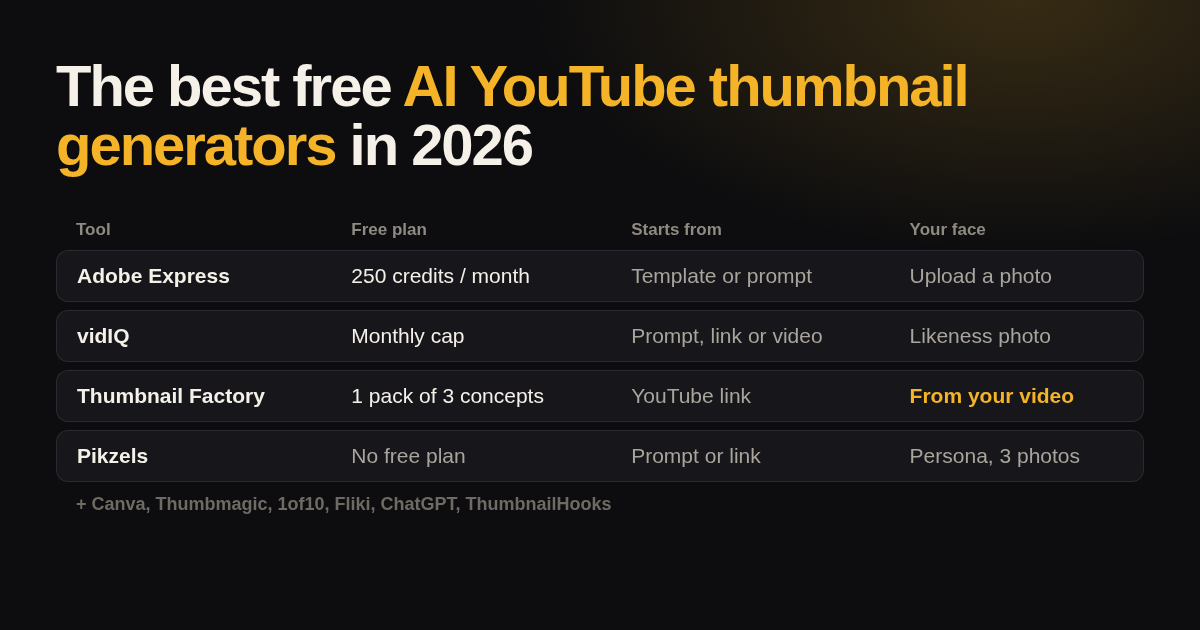
| Tool | What the free plan gives | Cheapest paid plan | You start from | Your face |
|---|---|---|---|---|
| Thumbnail Factory | 1 pack of 3 concepts with titles, no sign-up, no watermark | Credits, one-time, no subscription | A YouTube link | Taken from your video frames |
| Canva | Limited monthly AI use (no number published) | Canva Pro (price varies by country) | Templates | You upload and cut out a photo |
| Adobe Express | 250 generative credits per month | Premium, 11.89 € per month (EU) | Templates or a prompt | You upload a photo, background removal |
| vidIQ | A few thumbnails without an account, a monthly cap after free sign-up | Boost plan | A prompt, a YouTube link or a video | A “Likeness” photo and Face Swap |
| Pikzels | No free plan | $28 per month billed yearly | A prompt or a YouTube link | A Persona trained on 3 photos |
| Thumbmagic | 3 free thumbnails, no card | $17 per month billed yearly | A YouTube link, a video or a script | Avatars |
| 1of10 | 60 credits per month (4 per thumbnail) | $15 per month | A title | Supported, method not documented |
| Fliki | 3 credits per month, no sign-up | Standard plan | A topic or your video frames | Photo upload after sign-up |
| ChatGPT | Limited image creation (no number published) | Go, $8 per month (US) | A chat prompt | You upload a photo |
| ThumbnailHooks | 5 thumbnails per month, no card | $199 per year | A YouTube link, an image or a prompt | Face Reference on every plan |
1. Thumbnail Factory by ContentFries
You paste the link to a public or unlisted YouTube video up to 45 minutes long. Thumbnail Factory watches the video, reads the transcript and takes your face from the frames. About three minutes later you get a pack of three different concepts at 1280×720, each with a matching title: your face with the claim you make, an absurd metaphor for the topic, or the strongest moment of the video itself.
Free plan: the first pack is free, with no sign-up, no credit card and no watermark. You need a free account to download it.
Paid: packs and edits run on credits, bought once, no subscription needed. A pack costs 10 credits, an edit 1 credit, and credits do not expire.
Best for: creators who publish regularly and want three real ideas per video, ready for a YouTube Test & Compare A/B test.
Not the best pick when:
- the video is not on YouTube yet, because the tool starts from a YouTube link;
- you want to move every pixel yourself, because edits are described in words, not made in a layer editor;
- you need one thumbnail style repeated across a whole series. A template in Canva does that better.
2. Canva
Canva is a design editor with a huge library of YouTube thumbnail templates and some AI image tools on top. The free plan has “limited monthly access to premium AI tools”, and Canva does not publish the number. Background removal for your photo is a Pro feature.
Best for: people who like to design by hand and want a template library.
Limitation: the AI does not plan the thumbnail for you. You still decide the idea, the text and the layout.
3. Adobe Express
Adobe Express gives the free plan 250 generative credits per month, which is generous. The YouTube thumbnail maker opens on a 1280×720 canvas with templates, text-to-image and background removal. Premium is 11.89 € per month on the EU pricing page.
Best for: free design editing with plenty of generative credits.
Limitation: like Canva, it is an editor. The idea is still yours to find.
4. vidIQ
vidIQ’s thumbnail maker accepts a prompt, a YouTube link or an uploaded video and exports a 1280×720 PNG with no watermark. You can add a “Likeness” photo so the thumbnail shows you, or use Face Swap. You can try a few without an account; after a free sign-up there is a monthly cap that vidIQ does not put a number on.
Best for: creators who already use vidIQ for keyword research and analytics.
Limitation: one thumbnail per run and an unpublished free quota.
5. Pikzels
Pikzels is built around Personas: you upload three photos and it keeps your face consistent across thumbnails. It can also recreate a thumbnail from a YouTube link and write titles. There is no free plan; the site offers a trial without stating its terms. Premium starts at $28 per month billed yearly ($40 monthly).
Best for: faceful channels that want the same polished face on every video.
Limitation: the highest entry price on this list, and no free plan.
6. Thumbmagic
Thumbmagic comes from the team behind Submagic. It makes thumbnails from a YouTube link, a video or a script, with avatars for your face. The free tier is 3 thumbnails with no card. Starter is $17 per month billed yearly.
Best for: making a thumbnail straight from a video or script.
Limitation: three free thumbnails is a short trial.
7. 1of10
1of10 starts from your title and generates thumbnails and title ideas in the style of what works on YouTube. The free plan has 60 credits per month and a thumbnail costs 4. Basic is $15 per month.
Best for: planning titles and thumbnails before you record.
Limitation: the docs do not say how your face gets in or what resolution comes out.
8. Fliki
Fliki’s AI thumbnail maker works without sign-up and makes up to three variants per run from a topic or from frames of your video. The free plan has 3 credits per month and uses a lighter image model; the stronger models are paid only.
Best for: one quick free thumbnail without an account.
Limitation: Fliki itself notes the free model is weak at text on the image, and text matters on a thumbnail.
9. ChatGPT
ChatGPT can create images from a prompt and edit a photo you upload, and it can write titles in the same chat. The free plan has “limited image creation” without a published number. Go costs $8 per month in the US.
Best for: free back-and-forth on an idea, title and thumbnail together.
Limitation: the caps are unpublished and change, you write every prompt yourself, and you may need to crop to 1280×720.
10. ThumbnailHooks
ThumbnailHooks makes 1280×720 thumbnails from a YouTube link, an image or a prompt, with Face Reference on every plan. The free plan is 5 thumbnails per month with no card. Paid plans list “No Watermark”, so the free one may carry a watermark. Solo is $199 per year.
Best for: a few free thumbnails a month from a link.
Limitation: a small, newer product with little public documentation.
Microsoft Designer also makes images from a prompt, but its current pages do not state the free allowance and it has no thumbnail-specific flow, so we left it out of the ranking.
How to choose
Ask three questions:
- Where do you start? From a finished video, pick a tool that reads it (Thumbnail Factory, vidIQ, Thumbmagic). From a title, pick 1of10. From a blank canvas, pick Canva or Adobe Express.
- How does your face get in? Taken from your video, uploaded and cut out by you, or trained from photos. Thumbnails with a face tend to work better, so this matters more than the template count.
- How many ideas do you get? One thumbnail per run means you test against nothing. Three different ideas mean you can run a real A/B test in YouTube Studio and let watch time pick the winner.
Whatever you pick, judge the thumbnail together with the title. The thumbnail should either stand on its own or add what the title leaves out. If both say the same thing, one of them is wasted.
FAQ
Is there a completely free AI YouTube thumbnail generator?
Several tools have a free plan: Adobe Express (250 credits per month), 1of10 (60 credits per month), ThumbnailHooks (5 per month), Fliki (3 credits per month) and Thumbnail Factory (the first pack of three free). None of them is unlimited for free.
Which AI thumbnail generator uses my own face?
vidIQ (Likeness photo), Pikzels (Persona from 3 photos), Thumbmagic (avatars), ThumbnailHooks (Face Reference) and Thumbnail Factory, which takes your face from your video frames so you upload nothing.
Which size should a YouTube thumbnail be?
1280×720 pixels, a 16:9 ratio. YouTube’s help page on adding video thumbnails has the current limits.
Do I need a subscription?
No. Most tools here sell monthly plans, but Thumbnail Factory runs on credits bought once, no subscription needed, and every free plan above works without one.